# JavaScript Block Editor Component
A package of JavaScript Block Editor is a modern, block-based content editing solution for web applications. It provides an intuitive and flexible interface for creating rich, structured documents using interactive content blocks.
## What's Included in the JavaScript Block Editor Package
The JavaScript Block Editor package includes the following,
### JavaScript Block Editor
This [JavaScript Block Editor](https://www.syncfusion.com/javascript-ui-controls/js-blockeditor?utm_source=npm&utm_medium=listing&utm_campaign=javascript-blockeditor-npm) control is designed to support a wide range of block types and text formatting options, enabling users to compose and manage content with precision and ease. Whether for document editing, note-taking, or content creation tools, the Block Editor offers a seamless editing experience.
Getting Started .
Online demos .
Learn more
## Key features
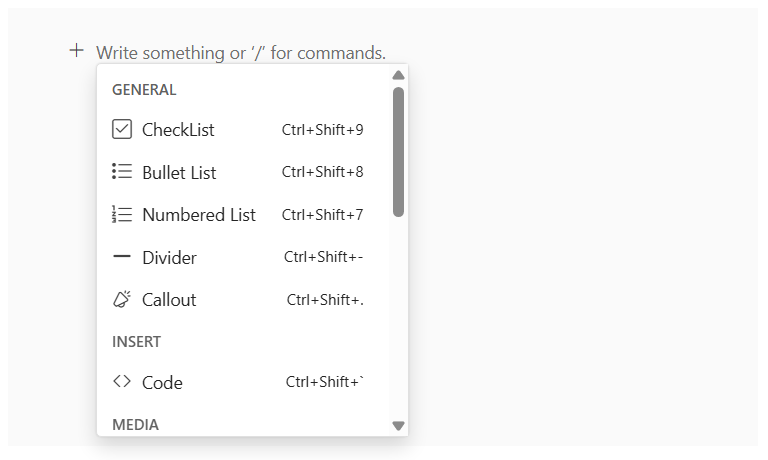
* **Multiple block types**: Includes Heading levels 1-4, Paragraph, Lists, Checklist, Quote, Callout, Divider, Code block, and more.
* **Slash commands**: Interactive `/` commands to insert or transform content blocks efficiently.
* **Drag and drop**: Reorder blocks effortlessly with built-in drag-and-drop support.
* **Rich text formatting**: Apply styles such as Bold, Italic, Underline, Strikethrough, Uppercase and more.
* **Action menu**: Perform block-level operations such as Move, Delete, and Duplicate.
* **Contextmenu support**: Right-click context menus for quick block actions.
* **Inline content support**: Insert inline elements like Links, Labels and Mention directly within blocks.
* **Undo/Redo operations**: Undo and redo support for the user interactions.
Trusted by the world's leading companies

## Setup
To install `blockeditor` and its dependent packages, use the following command,
```sh
npm install @syncfusion/ej2-blockeditor
```
## Supported frameworks
Input controls are also offered in following list of frameworks.
| [ ](https://www.syncfusion.com/angular-ui-components?utm_medium=listing&utm_source=github)
[Angular](https://www.syncfusion.com/angular-ui-components?utm_medium=listing&utm_source=github) | [ ](https://www.syncfusion.com/react-ui-components?utm_medium=listing&utm_source=github)
[React](https://www.syncfusion.com/react-ui-components?utm_medium=listing&utm_source=github) | [ ](https://www.syncfusion.com/vue-ui-components?utm_medium=listing&utm_source=github)
[Vue](https://www.syncfusion.com/vue-ui-components?utm_medium=listing&utm_source=github) | [ ](https://www.syncfusion.com/aspnet-core-ui-controls?utm_medium=listing&utm_source=github)
[ASP.NET Core](https://www.syncfusion.com/aspnet-core-ui-controls?utm_medium=listing&utm_source=github) | [ ](https://www.syncfusion.com/aspnet-mvc-ui-controls?utm_medium=listing&utm_source=github)
[ASP.NET MVC](https://www.syncfusion.com/aspnet-mvc-ui-controls?utm_medium=listing&utm_source=github) |
| :-----: | :-----: | :-----: | :-----: | :-----: |
## Showcase samples
* Expanse Tracker - [Source](https://github.com/syncfusion/ej2-sample-ts-expensetracker), [Live Demo]( https://ej2.syncfusion.com/showcase/typescript/expensetracker/?utm_source=npm&utm_campaign=numerictextbox#/expense)
* Loan Calculator - [Source](https://github.com/syncfusion/ej2-sample-ts-loancalculator), [Live Demo]( https://ej2.syncfusion.com/showcase/typescript/loancalculator/?utm_source=npm&utm_campaign=slider)
* Cloud Pricing - [Live Demo](https://ej2.syncfusion.com/demos/?utm_source=npm&utm_campaign=slider#/fluent2/slider/azure-pricing.html)
## Resources
* [Documentation](https://ej2.syncfusion.com/documentation/block-editor/getting-started)
* [Theme Studio](https://ej2.syncfusion.com/themestudio/)
* [Custom Resource Generator](https://crg.syncfusion.com/)
* [What's New](https://www.syncfusion.com/products/whatsnew/essential-js2?utm_medium=listing&utm_source=github)
* [Road Map](https://www.syncfusion.com/products/roadmap/essential-js2?utm_medium=listing&utm_source=github)
* [E-Books](https://www.syncfusion.com/ebooks?tag=javascript&utm_medium=listing&utm_source=github)
## Support
Product support is available through following mediums.
* [Support ticket](https://support.syncfusion.com/support/tickets/create) - Guaranteed Response in 24 hours | Unlimited tickets | Holiday support
* [Community forum](https://www.syncfusion.com/forums/essential-js2?utm_source=npm&utm_medium=listing&utm_campaign=javascript-blockeditor-npm)
* [GitHub issues](https://github.com/syncfusion/ej2-javascript-ui-controls/issues/new)
* [Request feature or report bug](https://www.syncfusion.com/feedback/javascript?utm_source=npm&utm_medium=listing&utm_campaign=javascript-blockeditor-npm)
* Live chat
## Changelog
Check the changelog [here](https://github.com/syncfusion/ej2-javascript-ui-controls/blob/master/controls/blockeditor/CHANGELOG.md/?utm_source=npm&utm_campaign=input). Get minor improvements and bug fixes every week to stay up to date with frequent updates.
## License and copyright
> This is a commercial product and requires a paid license for possession or use. Syncfusion’s licensed software, including this component, is subject to the terms and conditions of Syncfusion's [EULA](https://www.syncfusion.com/eula/es/). To acquire a license for 140+ [JavaScript UI controls](https://www.syncfusion.com/javascript-ui-controls), you can [purchase](https://www.syncfusion.com/sales/products) or [start a free 30-day trial](https://www.syncfusion.com/account/manage-trials/start-trials).
> A [free community license](https://www.syncfusion.com/products/communitylicense) is also available for companies and individuals whose organizations have less than $1 million USD in annual gross revenue and five or fewer developers.
See [LICENSE FILE](https://github.com/syncfusion/ej2-javascript-ui-controls/blob/master/license/?utm_source=npm&utm_campaign=input) for more info.
© Copyright 2025 Syncfusion® Inc. All Rights Reserved. The Syncfusion® Essential Studio® license and copyright applies to this distribution.